VOIDEX DOCUMENTATION
Voidex documentation
Install Voidex, create and open archives, and follow how codec selection, verification, formats and the benchmark numbers work.
01 · INSTALL
Install Voidex
Grab the latest release from the GitHub releases page. Voidex ships as a single portable executable — double-click it and it runs, in place, from wherever you put it.
- Download the latest release from GitHub and save the executable anywhere you like.
- Run it. Voidex opens to an empty workspace — drop a file in to get started.
- Keep it around. It remembers your last output location across runs and updates automatically when a new version drops.
Windows 10 or 11 (64-bit). Built on Tauri 2 with WebView2, which ships with current Windows. No admin rights, no installers, no registry writes.
02 · FIRST ARCHIVE
Your first archive
Compression in Voidex feels like moving a file: you drop something in, and a smaller file comes out.
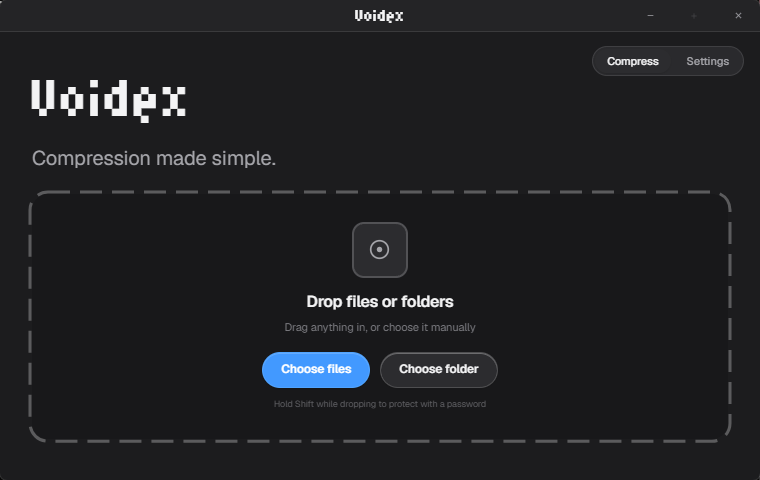
- Drop a file or folder onto the window — or drag it to the window's edge to trigger the drop zone.
- Voidex reads the content and picks a codec per file: zstd, Brotli, LZ4 or xz. It never makes you pick a container, method or profile.
- Choose VDX or ZIP for the output. VDX keeps the per-file codec map and verification; ZIP is a standard archive that works anywhere.
- Wait for the verdict. Voidex compresses, re-reads the result and verifies it before reporting success. The done state is a proof, not a promise.
Choose VDX when you'll keep the archive for yourself or reopen it in Voidex — it carries codec decisions and the Merkle-tree root. Choose ZIP when another tool or person needs to open it.
03 · OPEN & EXTRACT
Open & extract
Voidex opens the archives people actually pass around on Windows, and reads them for free — including WinRAR archives, with no trial nag attached to the reader.
| Format | Description |
|---|---|
| VDX | Voidex's own format. Verified, content-aware, smallest output — including folder archives. |
| ZIP · 7Z · RAR | Standard archives opened and extracted directly, with preview where supported. |
| TAR · GZ · TGZ · BZ2 · XZ · CAB · ISO | Recognized and handled for the formats people still pass around. |
Double-click a file inside an archive to preview it inline before deciding whether to extract it.
04 · CODECS
Codec selection
Most tools bind every file to one method forever. Voidex treats each file as its own problem and picks the codec that fits that content.
| Codec | Picked for | Character |
|---|---|---|
| zstd | Text, code, mixed content | Excellent ratio at high speed — the default balance. |
| Brotli | Web-style text and documents | Strong on JSON, HTML and human-readable text. |
| LZ4 | Already-dense data, caches, logs | Speed-first; throughput matters more than ratio. |
| xz | Large files where size wins | Maximum ratio, at the cost of time. |
The choice is stored inside every VDX archive, so extraction is deterministic — the same content always reopens exactly the way it was written.
05 · VERIFICATION
Verification
Voidex verifies every VDX archive it creates before completion, using a SHA-256 Merkle tree — the same integrity trick used by version-control systems.
- Hashing. As each file is compressed, its blocks are hashed into a tree whose root is the archive's checksum.
- Re-read. Before Voidex reports success, the finished archive on disk is read back in full.
- Compare. Every block is re-checked against the tree root. Anything that doesn't match is treated as failure, not silence.
# every VDX archive carries its own proof
└─ Project.vdx
   ├─ manifest      entries · codecs · sizes
   ├─ blocks        zstd · brotli · lz4 · xz payloads
   └─ root          SHA-256 Merkle root

# verification = re-read + rebuild the tree
read(Project.vdx)          → full read from disk
rebuild() · compare(root) → every block vs the tree
OK → finished  any mismatch → failed
A truncated or corrupted archive is never presented as done. If the bytes didn't make it, Voidex says so.
06 · FORMATS
Formats
What Voidex creates and opens, in one table.
| Format | Create | Open | Notes |
|---|---|---|---|
| VDX | Yes | Yes | Verified, content-aware, best ratio — files and folder archives. |
| ZIP | Yes | Yes | Standard, works everywhere; verified when Voidex writes it. |
| 7Z | — | Yes | Solid archives included. |
| RAR | — | Yes | Read for free, no trial nag. |
| TAR · GZ · TGZ · BZ2 · XZ · CAB · ISO | — | Recognized | Handled as needed. |
07 · LOCAL-FIRST
Local-first, always
Voidex has no account and no cloud processing step. The read–compress–verify–write cycle happens entirely on your PC; for regular archive work, zero bytes are uploaded to any server.
Uploaded. Your files are read, compressed, verified and written back to disk without leaving your computer.
08 · BENCHMARK
Benchmark method
The comparison behind the homepage numbers is reproducible: 100 lossless tests against WinRAR 7.11 in Smallest mode, raw results and full methodology committed to the repo.
Voidex produced the smaller archive in 89 of 100 cases — 5.5% less total output. Raw CSV/JSON and the full methodology live at github.com/axel0n/Voidex → benchmarks.
09 · FAQ
Frequently asked
What codecs does Voidex use?
Voidex selects zstd, Brotli, LZ4 or xz per file based on content. It creates standard ZIP archives and its own verified VDX format.
How does Voidex verify archives?
Every VDX archive is verified with a SHA-256 Merkle tree before Voidex reports success. The finished file is re-read and checked, so a truncated or corrupted archive is never presented as complete.
Does Voidex upload my files?
No. All compression, extraction and verification run locally. Voidex requires no account and uploads zero bytes for regular archive work.
What can Voidex open and create?
It creates VDX and ZIP archives and opens ZIP, 7z, RAR and VDX files, with direct preview for the most common formats.
How does Voidex compare to 7-Zip?
Both are free and local-first. Voidex adds content-aware codec selection, verifies every archive before reporting success, and ships as one portable ~15 MB executable with a modern UI and no ads. 7-Zip is a long-established classic with a dated interface.
Is Voidex a good WinRAR replacement?
Yes — Voidex is completely free where WinRAR is shareware, opens ZIP, 7z and RAR, creates ZIP and its own verified VDX format, and in a reproducible 100-test benchmark produced the smaller archive in 89 cases with 5.5% less total output than WinRAR 7.11 in Smallest mode.
Is Voidex really free?
Yes. No paid tiers, no ads, no trial and no feature gates. Compression, archive opening and verification are free.
How reproducible is the benchmark?
The benchmark runs 100 lossless tests with a documented methodology and raw CSV/JSON committed to the repo. In 89 of 100 cases Voidex produced the smaller archive — 5.5% less total output than WinRAR 7.11 in Smallest mode.
Ready to try it?
Free, local, verified. The price never changes from zero.